
Table of Contents
- Why Digitizing Old Family Film Reels Is Worth It for Most Families
- How to Tell If You Have 8mm, Super 8 or 16mm Film
- DIY vs Professional Film Transfer: Which Suits Your Reels?
- The Cost of Digitising 8mm Film: What Drives the Price
- How to Store Old Film Reels So They Last Until Transfer
- Damaged, Brittle or Vinegar-Syndrome Film: What Can Still Be Saved
- Choosing Digital Formats and Keeping the Files Safe Long Term
- Frequently Asked Questions
Last Updated: September 11, 2026
Why Digitizing Old Family Film Reels Is Worth It for Most Families
For most families wondering if digitizing old family film reels is worth it, the answer is yes, because film degrades whether or not anyone watches it, and a digital copy is the only version that survives being played. At Showbiz Video Productions, we have handled legacy media for more than 20 years, and reels that sat untouched for decades arrive in the worst condition.
The window to act is longer than most people fear: plenty of reels from the 1960s and 1970s are still transferable today, while plenty from the 1980s are not.
What You Actually Lose When Film Sits in a Cupboard
What you lose first is colour: dye layers fade at different rates, so old colour film drifts toward magenta or red long before the image disappears (peer-reviewed research). What you lose second is flexibility; a brittle, warped reel can often still be scanned, but it needs handling a home projector will not provide.
- Colour shift that no amount of playback will reverse
- Shrinkage that changes how the film sits on a projector sprocket
- Mould on the emulsion, which spreads to neighbouring reels stored in the same box
- Vinegar syndrome, the acidic breakdown that gives off a sharp, vinegary smell
A reel that smells like vinegar is not a lost cause, but it is a warning: the film is actively deteriorating and should be transferred sooner rather than later.
Storing reels in a hot garage, a roof cavity or a damp cupboard accelerates every one of these problems. Heat and humidity are the two biggest enemies of film, and most home storage in this climate provides both.
How to Tell If You Have 8mm, Super 8 or 16mm Film
Identify the format first, because it determines both the equipment needed and the cost. The three you are most likely to find are 8mm (also called Regular 8 or Standard 8), Super 8, and 16mm.
8mm film is the oldest small format, with a postage-stamp-sized frame and a distinctive double run: exposed down one half, flipped, then exposed down the other.
Super 8 film enlarged the frame by shrinking the sprocket holes, and is the most common format in family collections from the late 1960s onward.
16mm film is the largest and sharpest, more common in school, church and commercial footage than in home movies.
The easiest way to tell them apart is to look at the reel itself:
| Format | Frame Size | Sprocket Holes | Typical Era | Notes |
|---|---|---|---|---|
| 8mm | Small | Large, widely spaced | 1930s-1960s | Double run on one reel |
| Super 8 | Larger than 8mm | Small, closely spaced | 1965 onward | Most common home format |
| 16mm | Largest | Single row per side | 1920s onward | Sharper, often commercial |
Reel size matters too: a 3-inch reel holds roughly three minutes of Super 8 footage at standard sound speed, while a 7-inch reel holds considerably more. When estimating cost, count running time rather than physical reels.
DIY vs Professional Film Transfer: Which Suits Your Reels?
The question of is digitizing old family film reels worth it versus doing it yourself comes down to how much you value the footage and how much time you have. Home scanning suits small collections of clean, well-stored film on a tight budget; professional transfer suits anything fragile, valuable or numerous.
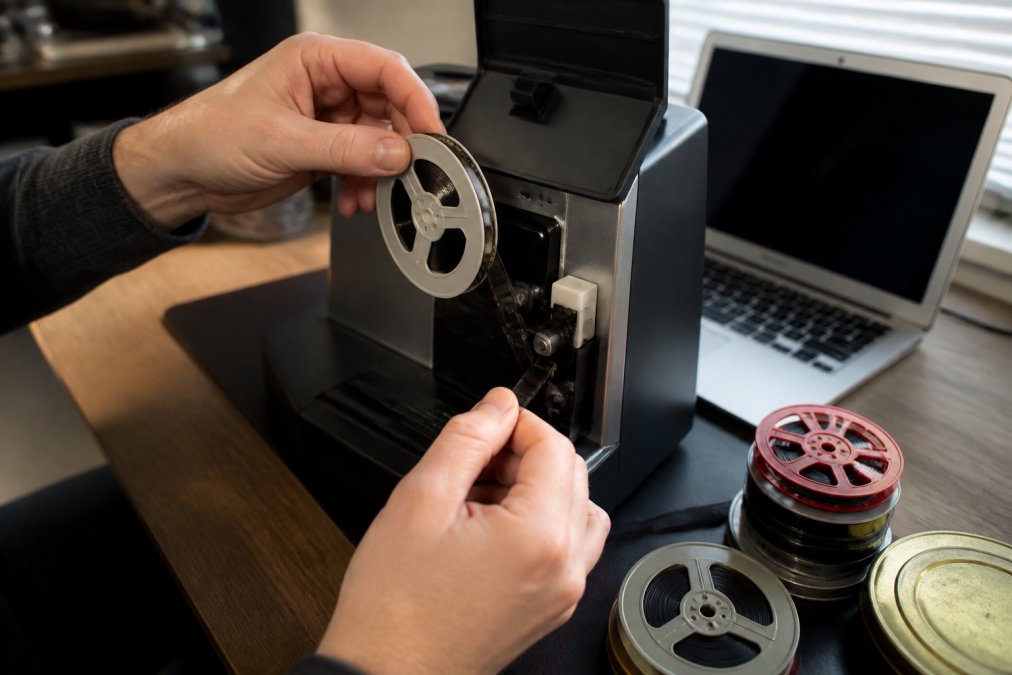
Most guides frame this as a quality contest, when it is really a risk contest. A home setup can produce a watchable result on a clean 3-inch reel of Super 8, and destroy a brittle, vinegary reel a professional scanner would have handled without incident.
A Practical Decision Framework
Work through these questions in order. The first one that applies usually settles the matter.
- Does the film smell of vinegar, feel brittle, or show visible mould? If yes, stop. Do not project it or thread it through a home scanner. Book a professional assessment. Vinegar syndrome is progressive and physical handling accelerates the damage.
- Is the collection more than about ten reels, or roughly an hour of running time? If yes, the time cost of DIY usually outweighs the savings: frame-by-frame scanning at real time means an hour of footage takes an hour, plus setup, cleaning and colour correction.
- Is the footage irreplaceable, a wedding, a deceased relative, a one-of-a-kind event? If yes, treat it as a professional job even if the film looks fine. The downside of a botched home scan is not a bad file; it is a damaged original.
- Are the reels clean, well-stored, and in a common format like Super 8? If yes, and you enjoy the process, DIY is a reasonable choice.
When Home Scanning Makes Sense
Home scanning suits a handful of reels in good condition, where you accept a learning curve and a slower result. You will need a film scanner or projector-and-capture rig, a dust-free workspace, and patience; expect real setup and troubleshooting time before you see a single frame.
The trade-off is control: you keep the film in your possession, which matters if you are nervous about posting irreplaceable material.
When to Hand the Job to a Transfer Service
Hand the job to a transfer service when the film is damaged, the collection is large, or the footage genuinely matters. Professional frame-by-frame scanning handles what home setups struggle with: flicker reduction, image stabilisation, and consistent colour correction across a whole reel.
A cheap projector setup will not match a scanned transfer, and the gap shows most on faded or damaged film, where a proper scan recovers detail a projector cannot resolve.
Damaged or Brittle Film: When DIY Is Not an Option
Physically damaged film is not a harder version of the same job, it is a different job.
- Splices and tears can often be repaired before scanning, but a failed repair on a home rig can tear the perforations and turn a recoverable reel into an unrecoverable one.
- Badly warped film must be gently flattened under controlled conditions before it will sit flat enough to scan; forcing it through a home scanner risks scratching the emulsion.
- Advanced vinegar syndrome shrinks and curls the film base, and professional scanners use gentler transport and lower tension than consumer equipment.
- Mould must be cleaned off first, or the scanner will smear spores across the emulsion and contaminate the machine for every reel that follows.
If any of these apply, DIY is not the budget option, it is the risky option. A professional assessment costs far less than a ruined reel.
Ask any transfer service two questions before you commit: what resolution and frame rate do you scan at, and do you clean the film before scanning? A service that cannot answer both clearly is not doing frame-by-frame work.
Privacy and Security When You Post Your Reels
Posting irreplaceable family film is the biggest anxiety most owners have, and it is a fair one. A few practical steps reduce the risk:
- Send in tracked, insured parcels and keep the tracking number. Ask how the service handles incoming and outgoing jobs.
- Photograph every reel and can before posting, so you have a record of what was sent and its condition.
- Ask whether the service stores your digital files, for how long, and whether they are deleted on request.
- Ask whether the original film is returned. Some services keep the reels unless you request them back.
The Cost of Digitising 8mm Film: What Drives the Price
The cost of digitising 8mm film depends on running time, film condition, and output format. Most services price per foot or per reel, so a box of short reels costs less than a single long one, even though it looks like more.
Several factors move the number up or down:
- Total running time, not the number of reels
- Film condition, since damaged or brittle film needs slower, more careful handling
- Format, because 16mm generally takes longer per frame than Super 8
- Output format and resolution, with higher-resolution scans and archival-quality files costing more
- Turnaround time, since rush jobs command a premium
At Showbiz Video Productions, pricing is transparent and starts at just $6, with no job too big or too small. Because rates depend on your specific reels, the most accurate figure comes from a quote rather than a published table. We also offer same-day service in most cases, which matters if you are working to a deadline such as a birthday or anniversary.
The cheapest quote is rarely the cheapest outcome. A low per-reel price that skips cleaning, colour correction or proper frame-by-frame scanning leaves you paying twice: once for the transfer, and again when you have it redone properly.
How to Store Old Film Reels So They Last Until Transfer
Store reels upright, in a cool, dry, dark place, in their original cans or archival boxes, away from heat, humidity and direct sunlight, the same advice for the week before transfer as for the years beforehand (National Parks Service).
- Keep reels vertical rather than stacked flat, so the film does not press on itself
- Store them away from windows, heaters and external walls
- Keep mouldy reels separate from clean ones so contamination does not spread
- Label each can with the format, approximate date and any known contents
If a reel already smells of vinegar, isolate it. Vinegar syndrome spreads, and a single affected reel can damage the rest of a collection stored in the same box.
Damaged, Brittle or Vinegar-Syndrome Film: What Can Still Be Saved
Damaged film can often still be saved, but the more brittle it is, the more the transfer depends on the operator’s skill and equipment. Splices, tears, warping and mould all add handling time, and some reels need repair before scanning.
Vinegar syndrome is the chemical breakdown of the film base, named for its sharp acetic smell. It is progressive, the single strongest argument for transferring sooner rather than later.
What can typically still be recovered:
- Minor splices and tears, which can be repaired before scanning
- Mild warping, which careful handling can flatten enough to scan
- Early-stage mould, which can be cleaned off the emulsion by hand
- Faded colour, which colour correction and digital restoration can substantially improve
Genuinely difficult cases are film that has shrunk badly, become fully brittle, or lost its emulsion layer. Even then, a professional assessment is worth the conversation, because the answer is often better than the owner expects.
Never run brittle or vinegary film through a projector to “check” it. The sprocket teeth can tear the perforations and turn a recoverable reel into an unrecoverable one.
Choosing Digital Formats and Keeping the Files Safe Long Term
Choose MP4 for everyday viewing and sharing, and MOV or a high-bitrate master for archival storage. Then treat the digital files with the same care you should have given the film, because a single copy on one device is not preservation.
For most families, the practical setup is three copies in two places:
- A master file in a high-quality format, kept untouched as your archive
- A viewing copy in MP4, easy to play on a TV, phone or laptop
- A cloud or external hard drive backup, stored somewhere other than your home
Digitising is only half the job; the other half is a long-term preservation strategy. A file sitting on one ageing laptop is barely safer than the reel it came from.
The Three-Copy Rule, Explained Properly
The three-copy rule is not just about having three files. It is about having three copies that fail for different reasons.
- Copy one, the master. A dedicated external drive at home, never edited, never renamed. Your reference version.
- Copy two, the working copy. A second drive or cloud folder you use for viewing, sharing and editing. If you corrupt this one, the master is untouched.
- Copy three, the off-site copy. Cloud storage or a drive at another address, surviving a fire, flood or theft at home.
Two drives on the same desk is one copy in two places, not two copies; a single power surge or spill takes both.
Metadata: The Difference Between a Folder and an Archive
A hard drive full of files called clip001 is technically preserved but practically useless. The next generation will not know who is in the footage, where it was shot, or why it mattered.
Build a simple metadata habit as you go:
- Name files consistently. A pattern like
1968-12-25_Christmas_Grandma-Smith.mp4tells a story at a glance. Pick a format and stick to it. - Record the basics for each clip: approximate date, location, people present, and the event. A plain text file or spreadsheet alongside the footage is enough.
- Embed what you can. Most video files support title, description and date fields, so the information travels with the file, not just your spreadsheet.
- Note the source. Record which reel the clip came from, so the digital file traces back to the original.
This is the highest-value thing you can do after the transfer itself. It costs nothing but time, and it turns a pile of files into a family archive.
Organising Thousands of Clips So They Are Actually Watchable
Once you have more than a few dozen clips, the problem shifts from preservation to retrieval. A structure that works for most families:
- Top level by decade or era, for example,
1960s,1970s,1980s. - Second level by event or year,
1968-Christmas,1972-Holiday,1975-Wedding. - Keep the master files separate from edited or viewing versions, so you never overwrite the archive.
Then build a simple index, a spreadsheet with columns for file name, date, people, location and a one-line description. It takes an afternoon and saves years of scrolling.
Keep your master files in a format and resolution you can still open in ten years. Avoid obscure codecs and proprietary formats, even if they save space today.
Digital Rot and File Migration
Digital files do not decay like film, but the systems holding them do: hard drives fail, cloud services shut down, and formats fall out of use. This is digital rot, and the defence is migration.
- Check your drives every year or two. Most give warning signs: strange noises, slow reads, failed writes. Replace them before they fail, not after.
- Re-copy your archive to new media every five to seven years (National Archives and Records Administration). A drive that works today may be hard to connect in a decade.
- Keep at least one copy in a widely supported format. MP4 and MOV are safe bets; if you used a niche codec for space savings, keep a mainstream copy alongside it.
- Do not rely on a single cloud provider. Accounts get locked, terms change, and free tiers disappear. Treat cloud storage as one copy, not the copy.
Sharing Without Losing Control
Once the archive exists, the natural next step is sharing it. A few habits keep that safe:
- Share viewing copies, never masters. Upload an MP4 to a private link or shared folder rather than handing over the archive drive.
- Be deliberate about what goes public. Family footage can include people who would rather not appear online; a private link to relatives is different from a public upload.
- Keep the originals. Even after digitising, store the reels properly. A good digital copy is not a reason to throw the film away.
For a mixed collection of film reels, VHS tapes, cassettes and vinyl, a single service that handles every format saves you from repeating the process several times over.
Frequently Asked Questions
How long do 8mm and Super 8 film reels typically last?
Most film reels stay watchable for 30 to 50 years when kept cool and dry, but colour dyes fade well before the base material fails. Vinegar syndrome, a chemical breakdown that smells like vinegar, can appear sooner in humid conditions. Once it starts, the damage spreads and is not reversible, so reels stored in a hot garage or cupboard are the ones most worth transferring first.
Is it better to digitise film reels myself or use a professional service?
It depends on your reels and your patience. DIY suits small batches of clean Super 8 in good condition, where a basic scanner and some time will do the job. Professional film transfer wins for 8mm, 16mm, spliced, brittle or faded reels, because frame-by-frame scanning, cleaning and colour correction need equipment most homes do not have. If the footage is irreplaceable, expert handling is the safer bet.
What is the best digital format for preserving family film reels?
Ask for a high-bitrate MP4 or MOV as your master file, plus a smaller MP4 for sharing on phones and TVs. MP4 plays almost anywhere, while MOV suits editing later. Keep the master untouched and make copies for family. Store one copy on an external hard drive and one in cloud storage so a single failure never wipes the footage.
Does digitising film reels improve the visual quality of the footage?
It can improve how the footage looks on a modern screen, but it cannot add detail that is not on the film. Professional scanning at high resolution captures more of what is there, and colour correction, flicker reduction and image stabilisation can make old reels look noticeably cleaner. Expect a steadier, brighter version of what you remember, not a restoration to new-film sharpness.
The real risk is not that digitising costs too much. It is that waiting costs you the footage entirely, one faded frame at a time. Showbiz Video Productions handles film reels, VHS, cassettes and vinyl in one place, with more than 20 years of experience, professional-grade equipment, same-day turnaround in most cases, and pricing from $6 with no job too big or too small. Get a quote from Showbiz Video Productions and turn those cupboard reels into files your family can actually watch.