
Last Updated: November 2, 2026
Quick Summary
Digitising an audio cassette takes about as long as the tape takes to play, so a 90-minute cassette needs roughly 90 minutes of real-time recording. Setup, monitoring, flipping and editing add to that total, so how long does audio cassette to digital take in practice is usually longer than the playing time alone.
- A C90 takes about 90 minutes of real-time playback, with each side recorded separately.
- Setup usually takes 10 to 20 minutes the first time, then about 5 minutes for later tapes.
- Editing and export typically add 10 to 30 minutes per side for a light clean-up.
- Ten C90 tapes equal about 15 hours of playback before any editing or export.
- Worn, damaged or badly levelled tapes can require re-recording, which doubles the time for that tape.
Table of Contents
- How Long a Cassette Takes to Digitise in Real Time
- Cassette Tape Recording Length and What It Means for Timing
- How to Digitise Cassette Tapes Yourself, Step by Step
- Cassette Tape Digitising Equipment You Will Need
- Factors That Slow Down or Complicate a Transfer
- Audio Cassette Digitising Service Turnaround Time Compared
- Booking Your Cassette Conversion With Showbiz Video Productions
- Frequently Asked Questions
How Long a Cassette Takes to Digitise in Real Time
Digitising an audio cassette takes about as long as the tape takes to play (Digitization Details: Re-Formatting Audio Cassettes). A 90-minute cassette takes roughly 90 minutes to make a digital copy, because the tape has to be played through in real time Duke University Libraries guidance on digitising audio cassettes. There is no fast-forward shortcut that keeps the sound intact.
That playback time is only the start. Most people are surprised by how much of the total job sits outside the playing time. Setup, levels, monitoring and saving all add to it.
The clearest way to think about it is in two parts:
- Playback time: the length of the tape, from start to finish
- Everything else: setup, checking, editing, exporting and any shipping or service queue
Keep these two parts separate when you plan. A one-hour tape might only need an hour of recording, yet the whole job can take far longer.
Cassette Tape Recording Length and What It Means for Timing
Cassette length decides how long each side plays, and that sets the minimum time for any transfer. Common lengths are C60, C90 and C120, which hold roughly 30, 45 and 60 minutes per side.
Each side must be played separately, so a C90 takes around 90 minutes of playing time across both sides. Flipping and checking the second side adds a few minutes, but it is a small cost.
Quick reference for playback time alone:
| Cassette | Total playing time | Approximate recording time |
|---|---|---|
| C60 | 60 minutes | about 60 minutes |
| C90 | 90 minutes | about 90 minutes |
| C120 | 120 minutes | about 120 minutes |
Batches grow quickly. Ten C90 tapes equal about 15 hours of real-time playback before any editing or export.
How to Digitise Cassette Tapes Yourself, Step by Step
If you want to do the transfer at home, the job is manageable with basic gear. The steps below follow the order most people use, with realistic time attached to each stage.
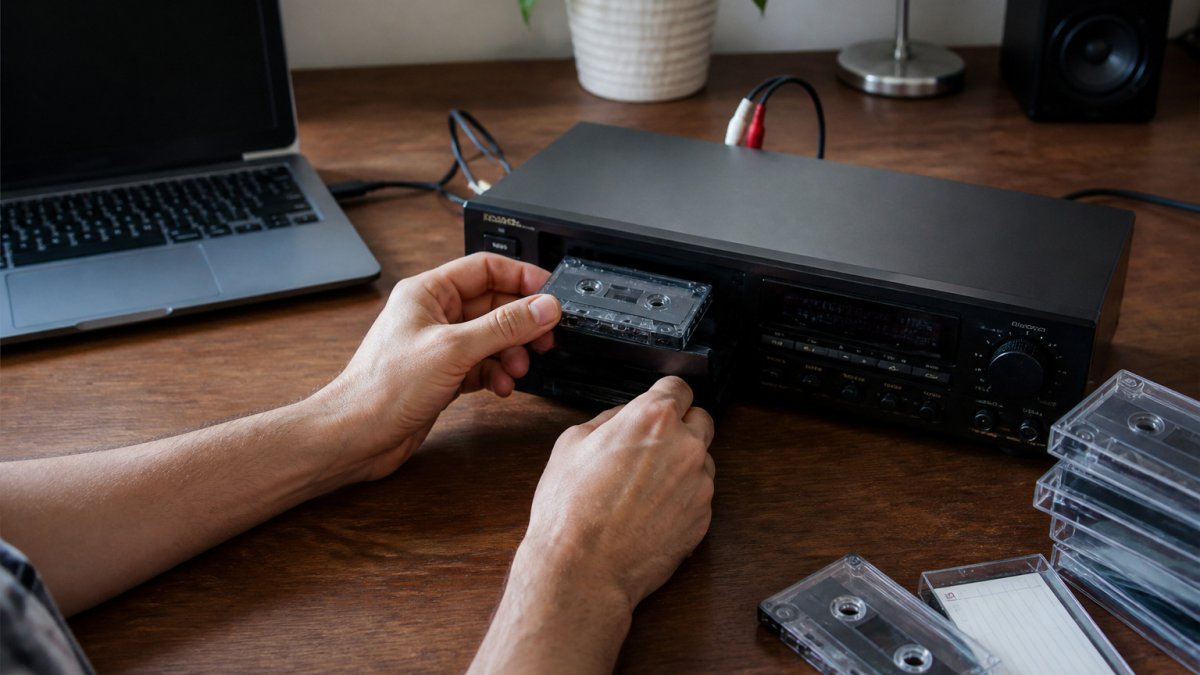
- Clean the tape deck heads with a cleaning cassette or swab. Allow 5 to 10 minutes, and repeat between tapes if the deck has been in storage.
- Connect the player to your computer with an audio cable or USB converter. Allow 5 minutes once the right cable is on hand.
- Open recording software and set the input level before you start. Allow 5 to 10 minutes for the first tape; later tapes reuse the saved settings.
- Press play and record in real time, watching the level meters. This stage runs for the full length of the side, so a C90 side takes about 45 minutes.
- Flip the tape and record the second side the same way. Add 2 to 3 minutes for the flip and a level check.
- Save and name the files before you move on. Allow 2 to 5 minutes per side, longer if you split tracks.
For a practical walkthrough of computer transfers, our guide on how to transfer cassettes to computer covers software choices and cleaning tips. Our cassette conversion guide also explains the full process from start to finish.
Setup, Monitoring and Editing Time
Setup usually takes 10 to 20 minutes the first time. You need to connect the cables, install software and test the levels. Later tapes go faster once the setup is saved, often down to 5 minutes.
Monitoring means listening during the recording to catch hiss, dropouts or a tape that has jammed. It does not add extra time to the clock, but it does mean you cannot walk away. This is the main reason batch transfers cannot run fully unattended: someone has to flip the tape and watch for problems.
Editing and export add time after recording. Trimming silence, removing noise and converting to MP3 or WAV can take as long as the recording itself, depending on how much cleaning the tape needs. A rough rule is 10 to 30 minutes of editing per side for a light clean-up, and closer to the full side length if you are removing noise track by track.
Worked estimates make this easier to plan. A single C60 tape with light editing is roughly 60 minutes of playback, 15 minutes of setup, 5 minutes of flipping and 20 minutes of editing, so about 1 hour 40 minutes end to end. A C90 is about 90 minutes of playback plus 15 minutes of setup, 5 minutes of flipping and 30 minutes of editing, so around 2 hours 20 minutes. Ten C90 tapes at that rate come to roughly 23 hours of elapsed work, which is why most people spread a batch over several evenings.
Watch out: if the input level is set too high, the recording will clip and you will have to redo the side, which doubles the time for that tape.
Cassette Tape Digitising Equipment You Will Need
You need four things for a home transfer:
- A working cassette player or tape deck
- An audio cable or USB audio interface to connect to the computer
- A computer with recording software such as Audacity, which is free
- Blank storage space for the audio files
A cheap USB converter is enough for most home collections. Check that the player’s output matches the converter’s input before you buy anything.
Factors That Slow Down or Complicate a Transfer
Several things can make a transfer take longer than the tape’s playing time:
- Worn or dirty tapes may need slower playback or repeated passes
- Tangled or damaged tape must be repaired before recording
- Poor audio levels mean re-recording, which doubles the time
- Noise reduction and cleanup adds editing time after recording
- Large batches multiply every step, so plan a few tapes per session
A high-quality copy can be harder than a basic transfer. The US National Archives notes that careful digitising can need expensive equipment and sometimes a trained professional US National Archives guidance on digitising audio materials. Treat that as a general technical point rather than local guidance.
Audio Cassette Digitising Service Turnaround Time Compared
Doing it yourself keeps you in control of timing, but a professional service works differently. When you ask how long does audio cassette to digital take through a service, the answer is usually measured in turnaround days or weeks, not hours, and that turnaround includes playback, processing and shipping.
The clearest way to compare is to split the timeline into three parts:
- Playback time: the same real-time duration as a DIY transfer, because the tape still has to play through
- Processing time: cleaning, track splitting, noise reduction and file export
- Logistics time: packing, posting, queueing at the service and return delivery
Because providers set their own schedules, check the current turnaround on the service’s own page rather than relying on a general figure.
Compare the two approaches directly:
| Approach | Hands-on time | Total timeline |
|---|---|---|
| DIY transfer | Playing time plus setup and export | Set by your own schedule; a C90 is about 2 hours 20 minutes end to end |
| Professional service | Packing and posting | Playback plus processing plus logistics; commonly days to weeks |
Recording time is the same either way. The difference is how much waiting and handling sits around it. A service does not make the tape play faster.
For a batch, the comparison changes. Ten C90 tapes are about 15 hours of playback alone, which is several evenings of DIY work once setup and editing are added. A service absorbs that playback into its queue, so the elapsed time for you is the logistics window rather than the hours at the deck. That is the point at which a service can be faster overall despite the tape still needing real-time playback.
Watch out: turnaround quotes usually start when the tapes arrive, not when you post them, so add delivery time in both directions before comparing a service against your own schedule.
Booking Your Cassette Conversion With Showbiz Video Productions
If you would rather not spend evenings at the tape deck, Showbiz Video Productions can handle the transfer for you. Pricing depends on how many tapes you have, the formats involved and the delivery method, so check the current rates and turnaround on our LP and cassette conversion page or request a quote.
Our tape to CD comparison can help you weigh home equipment against a professional service. Either way, separating playback time from processing time will give you a realistic schedule.
Frequently Asked Questions
How long does it take to digitise an audio cassette?
Recording a cassette in real time takes as long as the tape plays. A 90-minute cassette takes about 90 minutes to transfer, because the tape has to be played through once. Setup, monitoring, editing and exporting files add extra time on top of that. A professional service may take days to a few weeks to return files, depending on its queue and shipping, so ask for the current turnaround before you send tapes in.
Does converting a cassette to digital take as long as playing the tape?
For the recording itself, yes. Digital transfer runs in real time, so a 60-minute tape needs about an hour of playback. The total job is longer, though. You need time to set levels, check the recording, trim silence and save the file. Batch work can be done unattended only if the recording software is set up correctly and tapes are checked afterwards.
How long does a 90-minute cassette take to convert?
A 90-minute cassette takes about 90 minutes to play through and record, so the transfer itself is roughly an hour and a half. Allow extra time for setup and checking, and for any editing you want. If you are converting several tapes yourself, add up the playing time of each tape and then allow for the setup between them.
What affects the time it takes to digitise cassette tapes?
Tape length, the number of tapes, and how much preparation and editing you do all affect the total time. Tape condition can also slow things down, because damaged or tangled tape may need to be checked or repaired before it is recorded. If you use a professional service, shipping and the provider’s processing queue will add time beyond the tape’s playing time.
