
Table of Contents
- Inspect and Assess Your Records Before Converting
- How to Clean Vinyl Records Safely
- Essential Vinyl Record Cleaning Tools and Equipment
- Record Player Setup for Digitising Vinyl
- Best Audio Format for Vinyl Digitisation
- Recording Settings and Avoiding Clipping
- Capturing Each Record Side and Managing Large Collections
- Frequently Asked Questions
Last Updated: October 16, 2026
Inspect and Assess Your Records Before Converting
Learning how to prepare old vinyl records for digital conversion starts with inspection, which decides whether a digitisation project succeeds. Before connecting a turntable, assess every record in good light, it determines whether you capture clean audio or spend hours editing noise you cannot remove.
Work in Good Light and Handle by the Edges
Work on a clean, well-lit bench. Hold records by the edge and label only, finger oils attract dust and etch into grooves over time. A soft, lint-free mat protects the record while you inspect.
Check for Warping and Flatness
Sight across the record at eye level on a flat surface. A slight dish is usually playable; a pronounced warp that lifts the tonearm or causes skips is a red flag. A clamp can help mild warps, but severe warps risk your stylus and should be set aside. Never flatten warped records yourself with heat or weights, it usually makes things worse.
Look for Cracks, Scratches, and Groove Damage
Tilt the record toward the light and look for scratches that catch it. Hairline marks often play quietly; deep scratches you can feel with a fingernail will produce loud clicks or skips. Check the lead-in, lead-out and run-out for cracks, a crack reaching the playing surface means the record should not be played, as it can damage the stylus and the record further.
Identify Dirt, Mould, and Residue
Look for grey or white dust in the grooves, common on records stored in sheds or garages. Mould appears as fuzzy patches or a musty smell; mouldy records need careful cleaning before playback and should be isolated from the rest of your collection. Sticky residue from old cleaning products or spills traps debris and may need a targeted wet clean. Clean mouldy records in a well-ventilated area and consider wearing a mask.
Read the Label and Sleeve
The label tells you the pressing, catalogue number and often the year; a peeling or water-stained label suggests poor storage and likely groove damage. The inner sleeve matters too: torn paper sheds fibres, while PVC leaves sticky residue over time. Note both so you can replace the inner sleeve after cleaning.
Decide When Not to Play a Record
Some records are not worth the risk. Do not play a record that is badly warped, has a crack reaching the grooves, is covered in uncleaned mould, or has stylus-clogging residue, playing it can ruin the stylus and spread contamination. Set these aside for professional assessment or accept they may not be digitised.
Grade and Log Each Record
Adopt a simple condition scale: excellent (plays cleanly, minimal surface noise), good (light noise, no skips), fair (audible noise, occasional skip), poor (heavy noise, damage or warping). Log the grade, catalogue number and any issues in a spreadsheet, this becomes your workflow checklist and helps you prioritise records most likely to yield clean captures.
Inspect a batch of ten records before recording any of them. You will quickly see patterns in storage damage and can plan cleaning and stylus checks accordingly.
A record that passes inspection is ready for cleaning. A record that fails is better left unplayed than risked on your stylus.
How to Clean Vinyl Records Safely
Cleaning is the most important step before digitisation, dirt and dust in the grooves create pops and clicks that ruin your recording.
Start with a soft vinyl brush. Brush gently in straight lines from the centre outward, following the grooves, never in circles, which pushes dirt deeper.
For stubborn dirt, use distilled water with a small drop of mild dish soap.
A record cleaning machine helps, but careful hand cleaning works well for most home collections. The key is patience and gentle pressure.
What to Avoid When Cleaning
Never use paper towels or rough cloths, they scratch the surface and damage grooves. Avoid household cleaners, alcohol and acetone, which degrade vinyl over time.
Don’t soak records or let them sit wet, vinyl absorbs water and warps permanently. Never vacuum vinyl, however gently; static electricity damages the surface.
Don’t over-clean. If a record is already clean, leave it alone. Excessive cleaning causes unnecessary wear.
Essential Vinyl Record Cleaning Tools and Equipment
You don’t need a laboratory to clean vinyl safely, but you do need the right tools and method. The goal is to lift dust and residue out of the grooves without pushing it deeper or leaving moisture behind. Here is what works, what it costs and how to use it.
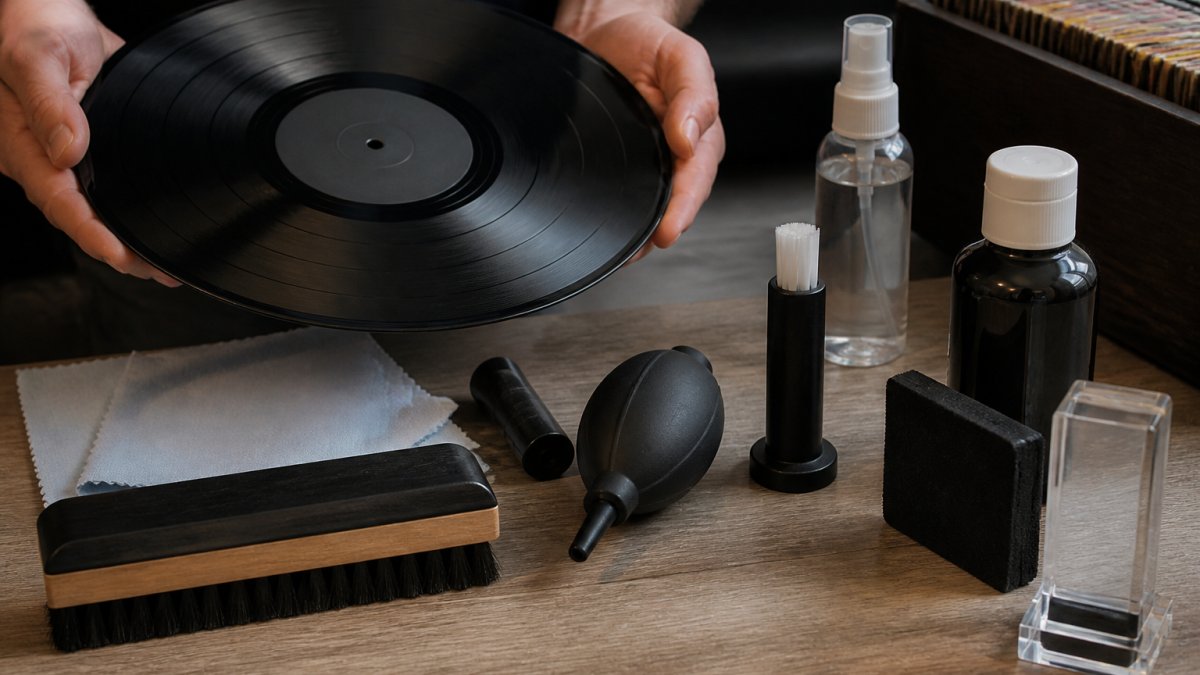
Core Tools and What They Cost
- Carbon-fibre or soft record brush: $10-$30 AUD. A carbon-fibre brush is the standard for dry cleaning. Use it dry, with light pressure, and let the bristles lift dust rather than scrub.
- Lint-free microfibre cloths: around $15 AUD for a pack of three. Cotton and paper towels shed fibres and can scratch. Microfibre designed for lenses or vinyl is safe.
- Distilled water: $3-$5 AUD per litre. Tap water leaves mineral residue that attracts more dust and can be difficult to remove.
- Mild, pH-neutral dish soap: a small bottle costs a few dollars. Use only a drop or two in a bowl of distilled water; strong detergents can leave residue.
- Record cleaning machine (optional): $150-$500 AUD or more. Useful for large collections or heavily soiled records, but hand cleaning works well for most home projects.
- Anti-static inner sleeves: $10-$20 AUD for a pack. Replace torn paper sleeves after cleaning to reduce future static and dust.
- Stylus brush: $10-$20 AUD. Clean the stylus before each side to avoid transferring dust to the record.
A Safe Dry-Cleaning Method
Place the record on a clean, lint-free surface. Hold the brush lightly against it and rotate by hand or let the turntable spin, working along the grooves from the outer edge toward the label with very light pressure, pressing hard pushes dust into the grooves. After a few rotations, inspect the brush; if it’s loaded with dust, clean it or use a second brush. Dry brushing suits lightly dusty records and should be done before every play.
A Safe Wet-Cleaning Method for Stubborn Dirt
Wet cleaning is for sticky residue, mould or heavy dust that dry brushing won’t shift. Use distilled water with a tiny drop of mild dish soap. Dampen (don’t soak) a microfibre cloth and wipe gently along the grooves, then immediately follow with a dry microfibre cloth to remove all moisture. Keep water off the label and out of the grooves. Air-dry a few minutes before playing; for mouldy records, clean in a well-ventilated area and consider replacing the inner sleeve.
What to Avoid
- Paper towels, tissues, and cotton cloths: they shed fibres and can scratch.
- Household cleaners, alcohol, acetone, and abrasive cleaners: they can degrade vinyl and leave residue.
- Soaking or submerging records: moisture can reach the label and cause warping.
- Vacuum cleaners: static and suction can damage the surface.
- Over-cleaning: if a record is already clean, leave it alone. Excessive cleaning causes wear.
Never use a cleaning method you have not tested on a low-value record first. Vinyl formulations and pressings vary, and some cleaning agents can dull the surface.
With these tools and methods, you now understand how to prepare old vinyl records for digital conversion without expensive equipment. The next step is setting up the playback chain so the stylus reads a clean groove accurately.
Record Player Setup for Digitising Vinyl
Your turntable is the heart of digitisation: it reads the vinyl, converts the grooves into electrical signals, and your recording software captures those signals as digital audio.
Place your turntable on a stable, level surface away from vibration and heat, nearby speakers or foot traffic interfere with playback, and direct sunlight and heat sources should be avoided.
Checking Your Stylus and Cartridge
The stylus is the needle that rides in the vinyl grooves. A worn or dirty stylus produces poor audio and damages records.
Clean the stylus with a soft stylus brush, gently from back to front following the needle’s angle, never side to side, which bends the stylus.
Check that the cartridge is properly aligned, misaligned cartridges skip grooves and distort audio. Consult your turntable’s manual; many have built-in alignment guides.
Connecting to Your Computer
There are two main ways to connect a turntable to a computer, depending on your equipment’s outputs and inputs.
USB connection: Some turntables have a built-in USB output.
RCA to audio interface: Most turntables have RCA outputs (red and white cables) that connect to an audio interface, a small device converting analogue audio into digital signals your computer understands.
RCA to computer input: Older computers sometimes have a line-in jack; connect RCA cables via a 3.5mm adapter. It works but gives less control than an audio interface.
Choose the method that matches your equipment. USB is simplest. An audio interface offers better quality and control.
Best Audio Format for Vinyl Digitisation
The format you choose affects file quality and storage space.
WAV files are large, about 600 MB per hour, but lossless, so no audio data is discarded and re-editing or re-exporting never costs quality.
After capturing the master WAV, create MP3 copies for everyday listening.
FLAC compresses audio without losing quality. Files are smaller than WAV but larger than MP3, ideal for high quality at smaller sizes, though not all devices play FLAC easily.
Recording Settings and Avoiding Clipping
Clipping happens when your audio level is too loud. The peaks get cut off, creating distortion that ruins the recording.
Set input gain so the loudest passages reach about 80% of maximum.
Start with lower gain and increase gradually, raising a quiet recording is easier than fixing a clipped one.
Check your software settings: 44.1 kHz and 16-bit depth match vinyl’s quality range.
Disable automatic gain control or compression in your software, they introduce artifacts and change the sound. Record the vinyl as it plays, without processing.
Capturing Each Record Side and Managing Large Collections
Each side of a vinyl record is a separate recording session.
Watch the level meter, it should dance with the music, staying in the safe zone.
When the side ends, stop recording. Label the file with the album name, artist, and side (A or B). Save it immediately.
Many people use Audacity, free for Windows and Mac, simple, with direct control over levels and file format.
After recording all sides, listen to each file for pops, clicks and distortion.
Digitising your vinyl collection rewards patience and care. We handle vinyl alongside VHS, film reels and cassettes, using professional-grade equipment and our 20-plus years of experience to deliver high-quality digital files that preserve your collection for decades to come.
Frequently Asked Questions
How should you clean old vinyl records before digitising them?
Start by using a soft record brush or microfibre cloth to remove surface dust, brushing from the centre outward in a circular motion. For deeper cleaning, use distilled water on a lint-free cloth, wiping gently in the same direction as the grooves. Never use household cleaners or abrasive materials. Allow records to air-dry completely before playing. Always handle records by the edges to avoid transferring oils to the playing surface.
Can you digitise a vinyl record without damaging it?
Yes, if you follow proper preparation and playback procedures. Ensure your stylus is clean and in good condition, as a worn or damaged stylus causes more wear than a clean, properly maintained one. Use a phono preamp or receiver to handle the signal correctly, and keep playback volume at moderate levels. The actual digitisation process does not damage the record, it’s the playback itself that creates minimal contact wear, which is unavoidable but negligible with careful technique.
What should you check on a record player before recording vinyl?
Inspect the stylus for wear, dirt, or damage using a magnifying glass if needed. Clean the cartridge gently with a soft brush. Check that the tonearm tracks correctly and that all connections (RCA cables, grounding wire) are secure and undamaged. Ensure your turntable is level and stable. Test the audio output by playing a few seconds of a record and monitoring the input levels on your computer to confirm the signal is clean and free of hum or distortion before beginning your full digitisation.
What audio format should you use when digitising vinyl records?
For archival preservation, record in WAV format at 44.1 kHz sample rate and 16-bit depth, which matches CD quality and is lossless. This preserves every detail of the original recording without compression. If storage space is limited, MP3 at 320 kbps is a reasonable compromise for listening copies, but always keep the original WAV files as your master archive. WAV files are widely compatible and will remain playable on future devices without quality loss.