
Table of Contents
- Why VHS to Digital Conversion Matters for Your Family
- Understanding Tape Degradation and Mould Remediation
- Cost to Convert Old Home Videos: What You’ll Actually Pay
- VHS to Digital Turnaround Time: Same-Day and Standard Options
- Best File Format for Home Video Digitisation
- How Professional VHS to Digital Conversion Works
- Handling Multiple Media Formats in One Job
- Protecting Your Irreplaceable Memories During Transfer
- Frequently Asked Questions
Last Updated: September 25, 2026
Why VHS to Digital Conversion Matters for Your Family
Your family’s memories are trapped in a format that’s slowly disappearing. VHS tapes degrade over time, and playback equipment is becoming harder to find. A VHS to digital service converts those irreplaceable moments into files you can access on any modern device, phone, tablet, or television, without worrying about further degradation.
The urgency is real. Heat, humidity, and age cause the oxide coating to flake away, colours to fade, and audio to distort. Once that happens, the memories are gone forever. Converting to digital is preservation.
At Showbiz Video Productions, we understand these aren’t just videos, they’re your family’s story. With over 20 years of experience, we’ve helped families protect their memories through professional digitisation. The process is straightforward, affordable, and fast.
Start with your oldest tapes first. The longer VHS media sits, the faster degradation happens. Tapes stored in hot, humid environments (like attics or garages) degrade much faster than those kept in climate-controlled spaces.
Understanding Tape Degradation and Mould Remediation
Magnetic tape doesn’t last forever. The oxide particles that store your video gradually separate from the plastic base in warm or damp conditions. Mould growth is common on tapes stored in basements or sheds and can spread to playback heads.
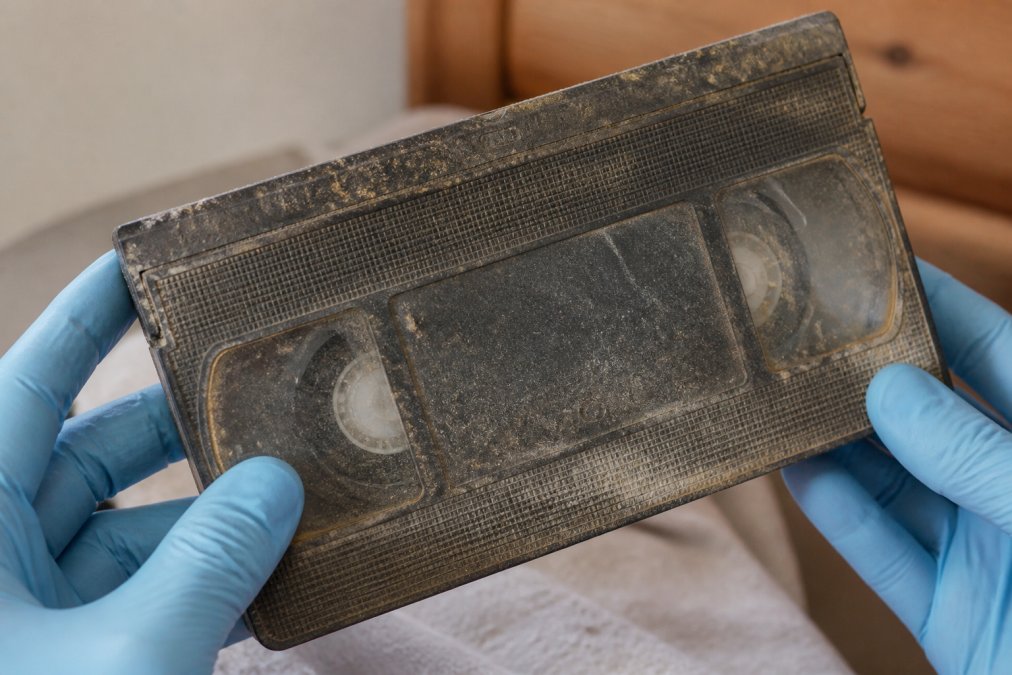
Professional digitisation services can often recover tapes that look damaged. Before conversion, tapes are inspected and cleaned to remove surface dust and mould spores. This cleaning protects equipment and improves the final digital file quality. If mould has penetrated deep into the tape, remediation techniques may stabilise the media before capture.
Some tapes are too far gone. If the tape has snapped, the oxide has completely flaked away, or the plastic has warped from heat, recovery is impossible. A professional assessment tells you whether your tapes are salvageable before you commit to the cost.
Never attempt to clean mouldy tapes yourself with household products. Mould spores can spread, and improper cleaning can cause more damage. Always let professionals handle contaminated media.
Cost to Convert Old Home Videos: What You’ll Actually Pay
Cost depends on how many tapes you have, their formats, and how quickly you need conversion. A VHS to digital service typically charges per tape, reflecting footage length and output format.
Pricing varies across providers. Some charge a flat rate per tape regardless of length; others adjust based on whether your tape is a standard 2-hour VHS or longer 6-hour cassette. Output options also affect cost, a digital file via USB costs less than the same file plus a physical DVD copy.
Showbiz Video Productions offers transparent pricing with no minimum order. Visit our website for current pricing. Bulk discounts may apply for larger jobs.
VHS is standard and usually the cheapest to convert. Specialty formats like VHS-C, Hi8, MiniDV, or film reels cost more because they require different playback equipment. A single service handling multiple formats saves you the hassle of finding separate vendors.
The real cost isn’t just the per-tape fee, it’s the cost of NOT converting. Tapes degrade daily. Waiting another year means risking permanent loss.
VHS to Digital Turnaround Time: Same-Day and Standard Options
Turnaround time depends on your needs. Most professional services offer standard processing (2-4 weeks) and expedited or same-day service.
Same-day service works for a handful of tapes but not 30 cassettes. It’s ideal for upcoming events when you’re in a time crunch.
Showbiz Video Productions specialises in fast turnaround, offering same-day service on most jobs. For larger batches, standard turnaround is measured in days rather than weeks.
Capturing a 2-hour tape takes roughly 2 hours of machine time. Delays usually come from queuing, quality control checks, and file preparation. A service promising same-day on every job without asking tape quantity is likely cutting corners on quality.
Best File Format for Home Video Digitisation
Your chosen format determines whether you can easily watch, share, or edit your videos later. A poor choice locks your memories into an obsolete or inaccessible format.
Understanding Common Digital Formats
Three formats dominate home video digitisation: MP4, AVI, and MOV. Each has distinct strengths and weaknesses.
MP4 (MPEG-4 Part 14) is the universal standard. It plays on virtually every device, smart TVs, smartphones, tablets, Windows and Mac computers, without requiring special software. MP4 maintains good quality at standard definition and future-proofs your collection.
AVI (Audio Video Interleave) produces higher quality files but is 2-3 times larger than MP4 with inconsistent compatibility. Many modern devices struggle with AVI playback. AVI is rarely recommended unless you plan extensive professional editing.
MOV (QuickTime) plays reliably on Mac and iPhone but often fails on Windows and Android devices without additional software. Unless your entire family uses Apple devices, MOV creates compatibility issues.
Resolution, Frame Rate, and File Size Trade-Offs
VHS is inherently standard definition (SD) at 720 × 480 pixels (NTSC) or 720 × 576 pixels (PAL). Upscaling to 1080p or 4K does not recover lost detail, it’s interpolation that creates larger files without genuine sharpness improvement.
Standard Definition (720 × 480 or 720 × 576) is recommended for VHS. A 2-hour VHS converted to MP4 at SD resolution typically produces a 1.5-2.5 GB file.
Frame Rate: VHS runs at 29.97 fps (NTSC) or 25 fps (PAL).
Codec Selection: H.264 vs. H.265
H.264 (AVC, Advanced Video Coding) is the industry standard and has been for over a decade. It offers excellent quality-to-file-size ratio and is compatible with virtually all devices manufactured in the last 10 years. If you’re unsure, H.264 is the safe choice.
Choosing the Right Format for Your Situation
For most families: MP4 with H.264 codec at native SD resolution (720 × 480 or 720 × 576) and 29.97 fps (or 25 fps for PAL). This delivers excellent quality, manageable file sizes, and universal compatibility.
Request a sample file before committing to a large batch. Ask the digitisation service to convert one tape and deliver it in your chosen format. Play it on your smart TV, phone, and computer to confirm it meets your expectations before processing your entire collection.
How Professional VHS to Digital Conversion Works
Professional conversion involves several steps to ensure quality and protect your original media.
Media Assessment and Cleaning
Tapes are inspected for physical damage, mould, or degradation. Visible mould or debris is carefully cleaned using approved methods. This protects both equipment and capture quality.
Tape Capture and Quality Control
The tape is played on professional-grade VCR equipment while being simultaneously captured to digital. Professional services maintain and calibrate their equipment to ensure consistent output.
Post-Conversion Organisation and Delivery
After capture, files are organised, labelled, and prepared for delivery. Professional services typically name files by date or tape number for easy sorting.
Handling Multiple Media Formats in One Job
If your collection includes VHS, 8mm film, VHS-C camcorder cassettes, and vinyl records, many services specialise in one or two formats, forcing you to split your job.
Families with mixed collections of old media formats who want everything digitised in one place without the hassle of finding multiple specialists.
Protecting Your Irreplaceable Memories During Transfer
Handing over original tapes understandably creates anxiety. But protection doesn’t end when you receive digital files. The real challenge is ensuring those files remain accessible and safe for decades.
Safe Handling During the Conversion Process
Professional services address transfer safety through trackable shipping, in-person drop-off and pickup, detailed intake forms, and claim tickets for tracking progress.
Organising Your Digital Files After Conversion
Once you receive converted files, you need a system to keep everything organised. A USB drive full of generic file names is useless if you can’t find what you’re looking for.
Backup Strategy: The 3-2-1 Rule
Digital files are fragile. Hard drives fail, USB sticks are lost, and cloud services shut down. The industry standard is the 3-2-1 backup rule: keep three copies on two different media types, with one copy off-site.
Three copies:
- Copy 1: Primary storage (external hard drive)
- Copy 2: Second external hard drive in a different location
- Copy 3: Cloud backup (Google Drive, Dropbox, or dedicated service)
Two different media types:
- External hard drives
- Cloud storage (different providers for multiple copies)
- Network-attached storage (NAS) if needed
Long-Term File Format Stability
Files can become inaccessible if the format becomes obsolete. MP4 is unlikely to disappear, but proprietary formats or older codecs may not be supported by future devices.
Sharing Files Safely with Family
Once your files are organised and backed up, you’ll want to share them with family. Cloud storage is convenient but introduces security considerations.
Your digitised memories are only as safe as your backup strategy. Conversion is the first step; organisation and backup are the steps that ensure your family’s story survives for generations.
Frequently Asked Questions
How much does it cost to convert old VHS tapes to digital?
The cost to convert old home videos depends on the number of tapes, their length, the output format you choose, and any restoration work needed. Pricing varies based on your specific requirements, so it’s best to get a personalised quote. Visit the pricing page or contact us for a transparent breakdown tailored to your collection size and budget.
What is the best file format for home video digitisation?
The best file format for home video digitisation depends on how you plan to use the files. MP4 offers broad compatibility across devices and platforms, making it ideal for sharing with family. Professional services typically offer multiple format options so you can choose based on your playback and storage needs.
Can you really offer same-day VHS to digital turnaround time?
Yes, same-day turnaround is available for most jobs, depending on tape length and complexity. Standard jobs are processed quickly using professional-grade equipment. Larger collections or tapes requiring restoration may take longer. Contact us with details of your project to confirm whether same-day service suits your needs or if a standard timeframe works better for your situation.
Will you be able to digitise tapes that haven’t been played in years and might be damaged?
Professional equipment can read most VHS tapes, even those stored for decades, provided the magnetic coating hasn’t severely degraded. If tapes show signs of mould, warping, or tape damage, restoration specialists can often remediate issues before conversion. We assess each tape individually to determine what’s salvageable and discuss any limitations upfront so you know what to expect.