Last Updated: October 22, 2026
Quick Summary
Vinyl to digital conversion preserves your record collection and makes it accessible on modern devices through either professional services or DIY setups. Professional services handle cleaning, playback, and file creation for irreplaceable records, while DIY conversion costs less per record but requires equipment investment and technical patience.
- Professional vinyl to digital conversion starts at $6 per item with same-day service available at Showbiz Video Productions.
- A basic DIY setup costs $200-$300 upfront and converts records at $0.50-$2 each after break-even, making it economical for collections over 20 records.
- Record one full side continuously, then split tracks after recording, and save files as WAV or FLAC with full metadata for archival quality.
- Proper cleaning takes 10-15 minutes per record and is the single biggest quality lever for reducing clicks and pops.
- Maintain three backup copies on two different media types with one stored off-site using a 3-2-1 backup pattern.
Table of Contents
- Vinyl to Digital Conversion: What You Need to Know
- Professional Vinyl Record Digitising vs DIY
- How to Convert Vinyl Records to Digital
- Vinyl to Digital WAV or FLAC: Choosing Your Format
- Vinyl to Digital Conversion Cost: What to Expect
- Key Considerations Before Converting Your Collection
- Conclusion
- Frequently Asked Questions
Vinyl to Digital Conversion: What You Need to Know
Converting vinyl records to digital files preserves your collection and makes it accessible on modern devices.
At Showbiz Video Productions, we’ve worked with hundreds of customers facing this decision. The right approach depends on what matters most: speed, sound quality, cost, or peace of mind.
This guide covers equipment, workflows, file formats, pricing, and the practical considerations that separate a smooth conversion from a frustrating one.
Professional Vinyl Record Digitising vs DIY
Professional vinyl record digitising services handle everything: cleaning, playback, file creation, and delivery. DIY conversion gives you control and saves money upfront, but requires equipment investment and time learning the technical side.
When Professional Transfer Makes Sense
Professional vinyl record digitising is worth the cost when records have sentimental or monetary value, when you lack technical confidence, or when turnaround time matters.
It suits families with irreplaceable home recordings, collectors with rare pressings, or anyone who can’t risk damage.
Professional services also clean records properly, apply RIAA equalization correctly, and often include metadata tagging.
Showbiz Video Productions handles vinyl alongside VHS, film reels, and cassettes, a single point of contact for mixed media collections.
When DIY Conversion Works
DIY conversion makes sense if you have time, technical patience, and a modest collection (under 20 records). The equipment investment spreads across many records, lowering the per-item cost significantly.
This path appeals to audio enthusiasts who want control over the recording process. You’ll need a turntable, phono preamp, audio interface or USB phono stage, and recording software, roughly $200-$500 for entry-level gear.
The hidden costs are time and learning curve.
DIY works best when you’re genuinely interested in the technical side. If the process feels like a chore, professional service becomes the better value.
How to Convert Vinyl Records to Digital
The conversion process involves four stages: preparing equipment, cleaning the record, capturing the audio, and editing files into usable tracks. What separates a clean transfer from a noisy one is the signal chain, cleaning discipline, and recording levels.
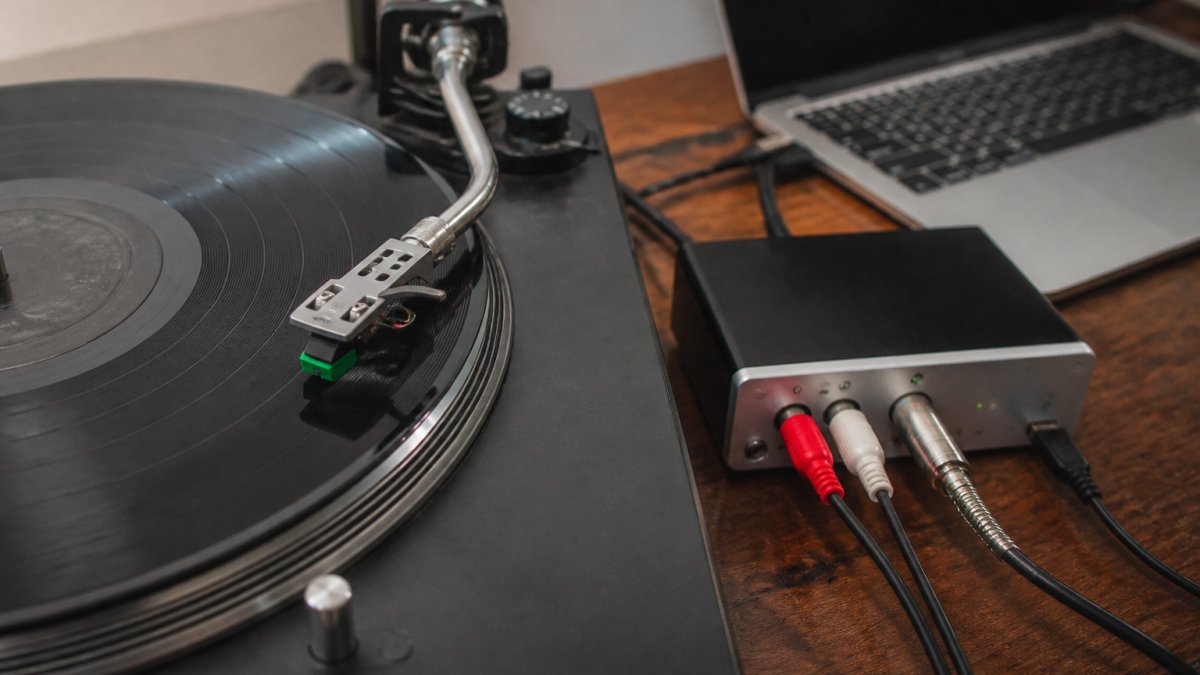
Essential Equipment and Setup
A vinyl-to-digital conversion setup requires a turntable, a way to amplify and equalise the signal, and a method to capture audio into your computer.
| Component | What to look for | Typical AUD range | Trade-offs |
|---|---|---|---|
| Turntable | Adjustable tracking force, anti-skate, a replaceable cartridge, and a stable platter | $150-$600 | USB models simplify cabling but often have budget preamps; a separate preamp gives more control |
| Cartridge/stylus | Elliptical or better stylus, known hours of use, correct tracking force | $40-$250 | A worn stylus causes distortion that no software can remove |
| Phono preamp | Accurate RIAA equalisation, low noise floor, adjustable gain | $50-$400 | Built-in preamps in budget USB turntables are the weakest link in most chains |
| Audio interface or USB phono stage | 24-bit/96 kHz capture, clean gain, no clipping at -6 dBFS | $80-$500 | A USB phono stage combines preamp and interface and reduces cabling |
| Recording software | Track splitting, metadata editing, non-destructive noise reduction | Free (Audacity) to $300+ | Free tools are sufficient for most collections; paid tools speed up batch work |
Turntable: Any turntable works, but better ones reduce noise and tracking distortion.
Phono Preamp: If your turntable doesn’t include one, a phono preamp applies RIAA equalisation, restoring the correct tonal balance.
Audio Interface or USB Phono Stage: This device converts the turntable’s analog signal into digital data.
Step-by-Step Recording Process
Clean the record thoroughly. Dust and dirt create clicks and pops that are difficult to remove digitally. Use a record brush or vinyl cleaning solution and let it dry completely. A wet clean takes 10-15 minutes per record and is the single biggest quality lever.
Set up your equipment chain. Connect the turntable to the phono preamp (if separate), then the audio interface, then your computer via USB. Confirm audio reaches your software, and keep cable runs short and away from power supplies to reduce hum.
Set recording levels. Adjust the input so audio peaks around -6 dB. Too loud causes clipping; too quiet wastes digital resolution. Record a 30-second test and inspect the waveform for flat-topped peaks before committing to a full side.
Record the entire side without stopping. Capture the full side as one continuous file, including any silence between tracks. This preserves the original sequence and timing and makes track splitting easier.
Monitor for noise. Listen through headphones while recording to catch skips, pops, or equipment problems in real time. Note the timecode of any defect so you can inspect it during editing.
Split tracks after recording. Identify where each track begins and ends, then save individual files. Add metadata (artist, album, track title) so files are properly identified. A consistent naming convention, artist, year, album, track number, title, saves hours later.
Apply noise reduction if needed. Audacity includes basic filters that reduce surface noise without damaging the music. Use sparingly; aggressive reduction sounds unnatural. Capture a short sample of surface noise from a silent groove as the noise profile.
Export in your chosen format. Save files as WAV, FLAC, or MP3 depending on your quality needs and storage constraints. Keep the unedited continuous side file as a master until you have verified the split tracks.
The entire process for one LP side typically takes 45-90 minutes, including cleaning, recording, and basic editing. For a 50-record collection, budget 40-75 hours of hands-on time.
Before converting a whole collection, digitise one record end-to-end and listen to the result on both headphones and speakers. If you hear distortion, hum, or excessive surface noise, fix the chain before scaling up.
Vinyl to Digital WAV or FLAC: Choosing Your Format
The format you choose affects file size, compatibility, and how well your collection survives the next decade of device changes.
WAV (Waveform Audio File Format) is uncompressed, preserving every bit of captured audio exactly.
FLAC (Free Lossless Audio Codec) compresses audio without losing information, cutting file size 40-60% versus WAV at identical sound quality.
MP3 uses lossy compression, discarding audio information to achieve small file sizes.
For vinyl-to-digital conversion, WAV or FLAC preserve the original recording faithfully.
Metadata, Track Splitting, and File Naming
A transfer is only as useful as its organisation. Before exporting, decide on a naming convention and tagging standard. A common pattern is Artist/Year - Album/TrackNumber - Title.flac, which sorts predictably in most players.
Track splitting deserves its own pass. Record the full side as one file, then split at the visual gap between tracks rather than guessing from the waveform alone.
Backup and Long-Term Preservation
Once converted, files should be backed up in at least two locations, an external hard drive and cloud storage is common. Follow a 3-2-1 pattern: three copies, on two different media types, with one off-site.
Plan for migration. A WAV or FLAC file is likely to remain readable, but the drive it sits on may not. Check your archive every few years, verify checksums if you keep them, and move the collection to current media before the old drive fails.
For archival, use FLAC at 24-bit/96 kHz with full tags and a consistent naming convention, keep the unedited side masters, and maintain three copies on two media types with one off-site. That combination gives you quality, findability, and recoverability without the bulk of WAV.
Professional services offer various output options, giving you flexibility depending on your needs; ask whether they deliver FLAC and whether metadata and track splitting are included or charged as add-ons.
Vinyl to Digital Conversion Cost: What to Expect
Costs vary dramatically between professional services and DIY. Understanding both helps you decide what makes financial sense.
Professional Service Pricing
Professional vinyl record digitising services typically charge per record or per album side, depending on location, turnaround time, and included features like cleaning and metadata tagging.
Pricing generally varies for standard transfers, with volume discounts often available for larger collections.
Showbiz Video Productions offers transparent pricing starting at $6 per item, with same-day service available for most jobs. Exact pricing depends on your specific collection and requirements, so requesting a quote gives you a clear figure for your needs.
For a collection of 50 records, professional service costs depend on the provider and any volume discounts. For 100 records, costs scale proportionally.
DIY Equipment Investment
A basic DIY setup requires an upfront investment in equipment like a turntable, audio interface, cables, and recording software. After that, it converts unlimited records at no additional cost beyond your time.
The break-even point varies. Beyond that, DIY costs less per record; for smaller collections, professional service can be a better value once you factor in your time.
| Conversion Method | Setup Cost | Cost Per Record | Best For |
|---|---|---|---|
| Professional service | None | $19-$24 | Small collections, rare records, peace of mind |
| DIY with budget equipment | $200-$300 | $0.50-$2 (after break-even) | Larger collections, technical interest |
| DIY with quality equipment | $400-$800 | $0.50-$2 (after break-even) | Audiophiles, extensive collections |
Key Considerations Before Converting Your Collection
Several practical factors influence whether conversion is worth the effort and which approach suits you best.
Record Condition and Cleaning
Record condition directly affects conversion quality and whether professional service is necessary.
Proper cleaning removes dust and static that cause clicks and pops. A record brush works for light dust; a wet-cleaning solution is necessary for visible dirt.
Heavily damaged records, warping, deep scratches, or mold, may not play cleanly on any turntable. Professional services can sometimes work with damaged media, but results depend on the extent of damage.
Audio Quality and File Preservation
Vinyl records contain analog information that must be converted to digital data. Conversion quality depends on turntable quality, preamp accuracy, and recording technique.
Higher-quality turntables reduce tracking distortion and noise; better preamps apply RIAA equalization more accurately, preserving tonal balance.
Consider your long-term plans. To preserve records for future generations, archival-quality formats (WAV or FLAC) and professional conversion are worthwhile investments.
Conclusion
Converting vinyl records to digital preserves your collection and makes it accessible on modern devices. Professional vinyl record digitising services handle the technical complexity and deliver results quickly, ideal for irreplaceable recordings or large collections.
For families with sentimental recordings, mixed media collections, or tight deadlines, Showbiz Video Productions offers same-day service with professional-grade equipment and transparent pricing. We handle vinyl alongside VHS, film reels, and cassettes, everything your collection needs in one place.
Frequently Asked Questions
What is the best way to convert vinyl records to digital?
The best approach depends on your collection size and audio quality expectations. For small collections or occasional use, a basic turntable connected to a computer with recording software works well. For larger collections or archival quality, professional vinyl to digital conversion services use calibrated equipment and produce cleaner files with reduced surface noise. Professional services handle cleaning, level optimisation, and metadata tagging, making them ideal for irreplaceable recordings or when time is limited.
Should I digitise vinyl records myself or use a professional service?
Choose professional digitisation if your records are valuable, rare, or you want studio-quality results with minimal effort. Professional vinyl record digitising includes expert cleaning, proper turntable calibration, and noise reduction. Choose DIY if you have basic equipment already, enjoy the process, and your collection is small. DIY works for casual listening but may not match the audio fidelity of professional transfer. Consider the time investment: professional services often deliver faster results, especially for large collections.
Which digital file format is best for preserving vinyl recordings?
WAV and FLAC are the best formats for archival preservation. WAV stores audio uncompressed at full quality, making it ideal for long-term storage and future compatibility. FLAC compresses audio losslessly, using less storage space whilst retaining all original detail. Both formats preserve the full fidelity of your vinyl to digital conversion and won’t degrade with time. MP3 compresses audio with quality loss and is suitable only for casual listening, not preservation. For archival purposes, pair WAV or FLAC with secure backup storage.
How much does it cost to have vinyl records digitised?
Professional vinyl to digital conversion cost varies by service and quantity. Pricing typically depends on the number of records, turnaround time, and output quality. Many services offer transparent per-record pricing, with discounts for bulk orders. DIY conversion requires an initial equipment investment in a turntable, audio interface, and software, but costs nothing per record after setup. For current pricing and quotes tailored to your collection size, contact your chosen service directly to compare value and delivery timeframes.
What equipment do I need for DIY vinyl to digital conversion?
You’ll need a turntable with a cartridge and stylus in good condition, a phono preamp or USB turntable to amplify the signal, an audio interface or USB recorder to capture sound, and recording software on your computer. A record cleaning kit reduces pops and crackles before digitisation. Choose a turntable suited to your budget; even mid-range decks produce acceptable results. Ensure your audio interface supports your desired output format (WAV or FLAC). Quality matters at each stage, but you don’t need professional-grade gear for personal projects.
