
Table of Contents
- Understanding the Cost to Convert Old Home Videos
- DIY VHS Digitising Equipment Cost and What You’ll Need
- Professional Conversion Services: Pricing Models and Fees
- VHS to Digital Conversion Quality Comparison
- Supported Media Formats and File Compatibility
- Bulk Discount for Video Tape Conversion and Timeframe
- File Size, Storage, and Post-Conversion Management
- DIY vs Professional: Making Your Decision
- Frequently Asked Questions
Last Updated: September 30, 2026
Understanding the Cost to Convert Old Home Videos
The cost to convert old home videos ranges significantly depending on whether you handle it yourself or hire professionals. DIY digitisation requires an upfront investment in equipment but works well for small collections, whilst professional conversion services offer convenience and quality assurance at a per-tape or flat-rate cost. Showbiz Video Productions helps families across the region understand these options so they can make the right choice for their treasured memories.
The decision between DIY and professional conversion isn’t just about price, it’s about your comfort level with technology, the condition of your tapes, and how quickly you need results.
DIY VHS Digitising Equipment Cost and What You’ll Need
Setting up a DIY digitisation station requires three key components: a playback device, a video capture card or USB dongle, and suitable storage and software. The total investment typically falls between a few hundred dollars, depending on equipment quality and what you already own.
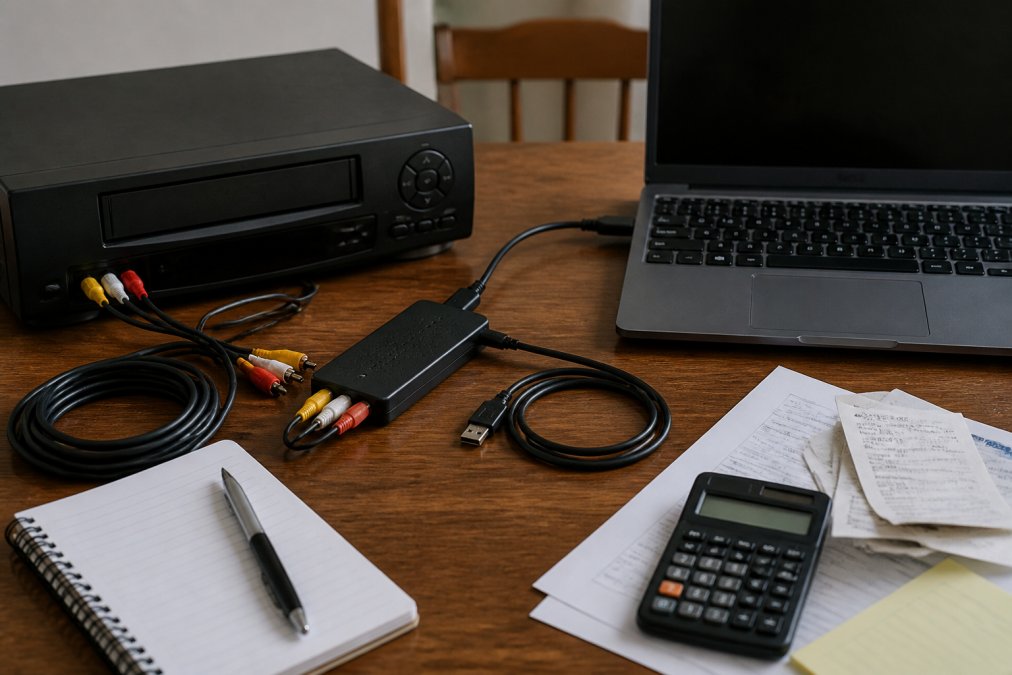
Video capture cards and USB dongles
A video capture card or USB dongle is the bridge between your old playback equipment and your computer. Capture cards come in two main types: internal cards that install inside your desktop PC, or external USB devices that work with any computer.
VCR or playback device requirements
You’ll need a working VCR, 8mm camcorder, or film projector depending on your media format. VCRs are still widely available secondhand, though older machines may have tape head cleaning issues or tracking problems that affect playback quality. Before investing in capture equipment, test your playback device with one of your tapes to ensure it still works reliably.
Software and storage needs
Video capture software ranges from free (bundled with many capture devices) to professional-grade options costing hundreds of dollars. Free software usually works adequately for basic digitisation, though it may lack advanced features like noise reduction or aspect ratio correction.
Professional Conversion Services: Pricing Models and Fees
Professional conversion services typically use one of two pricing structures: per-foot pricing (based on tape length) or flat-rate pricing per item. Understanding these models helps you calculate true costs for your collection.
Per-foot and flat-rate pricing explained
Per-foot pricing charges you based on how much tape content you’re converting. A 120-minute VHS tape might be priced at a certain rate per foot of magnetic tape. This model rewards shorter tapes but can become expensive for feature-length recordings or multiple-hour family videos.
Setup charges and hidden fees to watch for
Some services charge a setup or handling fee separate from the per-tape cost. This might cover tape inspection, cleaning, or equipment preparation. Always ask whether your quoted price includes delivery costs, rush fees, or charges for damaged tape repair.
VHS to Digital Conversion Quality Comparison
The quality of your digitised files depends on your capture method, the original tape condition, and the output format you choose. Professional equipment produces noticeably sharper images with better colour accuracy than consumer-grade USB dongles.
Resolution, frame rate, and aspect ratio differences
Standard VHS records at approximately 240-250 lines of resolution, which translates to roughly 720×480 pixels (NTSC) or 720×576 pixels (PAL) in digital form. This is lower than modern video standards, but it’s the maximum fidelity your original tape contains.
Quality assessment checklist for your converted files
Before accepting digitised files, check these markers of quality:
- Playback smoothness without stuttering or dropped frames
- Colour accuracy, skin tones should look natural, not oversaturated
- No visible noise or pixelation during playback
- Audio synchronisation with video (lips match speech)
- File integrity, the video plays completely without corruption
- Proper aspect ratio without letterboxing or stretching
Many people discover quality issues only weeks later when sharing files with family. Professional services typically allow you to review samples before committing to full conversion of your entire collection.
Supported Media Formats and File Compatibility
Your old home videos likely exist in multiple formats, each requiring different playback equipment and conversion approaches.
Source formats: VHS, 8mm, Hi8, Betamax, and film reels
VHS (Video Home System) is the most common format, but 8mm and Hi8 camcorder tapes are also widespread. Betamax, though less common, still exists in many collections. Film reels, typically 8mm or 16mm, require a projector and special capture equipment.
Output formats: MP4, DVD, AVI, and codec choices
Once digitised, your files need to be stored in a format that plays on modern devices. MP4 is the most universal, it plays on smartphones, tablets, smart TVs, and computers without additional software. DVD format works on older DVD players and some modern devices, though it’s less practical for sharing digitally.
| Output Format | File Size | Device Compatibility | Best For |
|---|---|---|---|
| MP4 (H.264) | 1-3 GB per hour | Universal | Sharing, streaming, modern devices |
| DVD | 4.7 GB per disc | DVD players, some TVs | Playback on older equipment |
| AVI | 8-15 GB per hour | Computers only | Archival, high quality |
| MP4 (H.265) | 0.5-1.5 GB per hour | Limited device support | Future-proofing, storage efficiency |
Bulk Discount for Video Tape Conversion and Timeframe
If you have a large collection, ask about volume pricing. Many professional services offer discounts when you convert 20, 50, or 100+ tapes at once.
Volume pricing and minimum order considerations
Some providers impose minimum order requirements, perhaps 5 or 10 tapes, to justify setup and handling costs. Showbiz Video Productions accepts single tapes or small batches without minimums. This flexibility matters if you’re testing the service with just a few tapes before committing your entire collection.
Project completion timeframes and turnaround times
DIY digitisation is entirely on your schedule, you can work through your collection at whatever pace suits you. However, most people underestimate how long it takes. A single 2-hour tape requires at least 2 hours of capture time, plus additional time for file review and storage organisation.
File Size, Storage, and Post-Conversion Management
Once your tapes are converted, you’ll have digital files that need proper storage and backup to ensure they survive for generations.
Understanding file compression and bitrate
Bitrate, measured in megabits per second, determines how much visual information is retained during compression. Higher bitrate means better quality but larger files. A typical MP4 video uses a bitrate of 5-10 Mbps, which balances quality and file size reasonably well.
Cloud backup and external hard drive storage options
Storing files on a single hard drive is risky, drives fail, and you’d lose everything. A 3-2-1 backup strategy is industry standard: keep 3 copies of your files, on 2 different storage types, with 1 copy off-site.
DIY vs Professional: Making Your Decision
The right choice depends on your collection size, technical comfort, tape condition, and timeline.
When DIY makes sense for your project
DIY works best if you have fewer than 10 tapes, they’re in good condition, you have time to learn the process, and you’re comfortable troubleshooting technical issues. It’s also suitable if you’re experimenting to see whether digitisation is worth your effort before committing to a larger project.
When professional conversion is worth the investment
Professional conversion makes sense for large collections, rare formats, damaged or degraded tapes, or when you need results quickly. If you have 30+ tapes, the per-tape cost of professional service often works out cheaper than your time investment in DIY, even accounting for equipment costs.
Common mistakes to avoid during digitisation
The most frequent error is underestimating time and storage needs. People start a DIY project, run out of hard drive space halfway through, and abandon it. Plan your storage before you start capturing.
Frequently Asked Questions
How much does it typically cost to convert old home videos to digital?
The cost to convert old home videos depends on several factors: the number of tapes, their format (VHS, 8mm, film reels), desired output quality, and whether you choose DIY or professional services. DIY equipment ranges from budget options to several hundred dollars upfront, plus software costs. Professional conversion services typically charge per foot of tape or offer flat rates for projects. Pricing varies based on volume and complexity. For current rates and a personalised quote, contact a professional service to understand costs for your specific collection.
Is it cheaper to digitise VHS tapes yourself or use a professional service?
DIY digitisation has lower per-unit costs if you’re converting many tapes, but requires purchasing a video capture card or USB dongle, a working VCR, and editing software. Initial equipment investment ranges from moderate to significant. Professional services charge per tape or per foot, which spreads costs across your collection. For small collections (5-15 tapes), professional services often prove more economical since you avoid equipment costs. For large collections, DIY may be cheaper long-term, but professional services guarantee quality, handle fragile media safely, and save considerable time. Consider tape degradation risk when deciding.
What factors influence the cost of converting old film reels?
Film reel conversion costs depend on reel diameter (8mm, 16mm, 35mm), film condition, length in feet, desired resolution and frame rate, and whether the film shows signs of degradation or mould. Professional services assess tape head cleaning needs and may charge additional fees for restoration work. Archival-quality output costs more than standard digital files. Output format choice (MP4, DVD, or high-bitrate master files) affects pricing. Volume discounts often apply for bulk conversion. Professional handlers use specialised equipment to manage delicate film safely, which influences service costs.
Are there hidden costs when digitising old home videos?
Yes. Beyond the base conversion fee, watch for setup charges, tape head cleaning fees (if media shows degradation), rush delivery charges, and storage or backup costs. Some services charge extra for specific output formats or higher bitrate files. If tapes show mould or tracking issues, restoration work adds expense. External hard drive or cloud backup services for long-term file storage are separate costs. Always ask about the complete fee structure upfront, including any minimum orders or volume requirements, to avoid surprises.