
Table of Contents
- Understanding Home Video Conversion Quality
- Hardware Requirements for Digitisation
- Best File Format for Digitising VHS
- VHS to Digital Resolution Guide
- Is Digitising Family Film Reels Worth It
- How to Improve Old Video Quality During Conversion
- Long-Term Digital Preservation and Storage
- Common Video Transfer Problems and Solutions
- Frequently Asked Questions
Last Updated: September 22, 2026
Understanding Home Video Conversion Quality
Home video conversion quality refers to how faithfully your original analogue media is transformed into a digital format that preserves colour accuracy, detail, and clarity, capturing what was recorded before further degradation occurs.
Decades-old VHS tapes and 8mm film often show deterioration: magnetic tape loses its properties, film emulsion becomes brittle. Conversion quality depends on three factors: the condition of your original media, the equipment used to read it, and the technical choices made during digitisation.
Quality digitisation requires time and attention. Some services run media through automated systems with minimal inspection; others examine each tape, adjust equipment for optimal signal quality, and apply restoration techniques. That distinction matters enormously for irreplaceable family memories.
Hardware Requirements for Digitisation
Converting home video properly requires specific equipment designed to read analogue signals reliably and access the original quality on your tape.
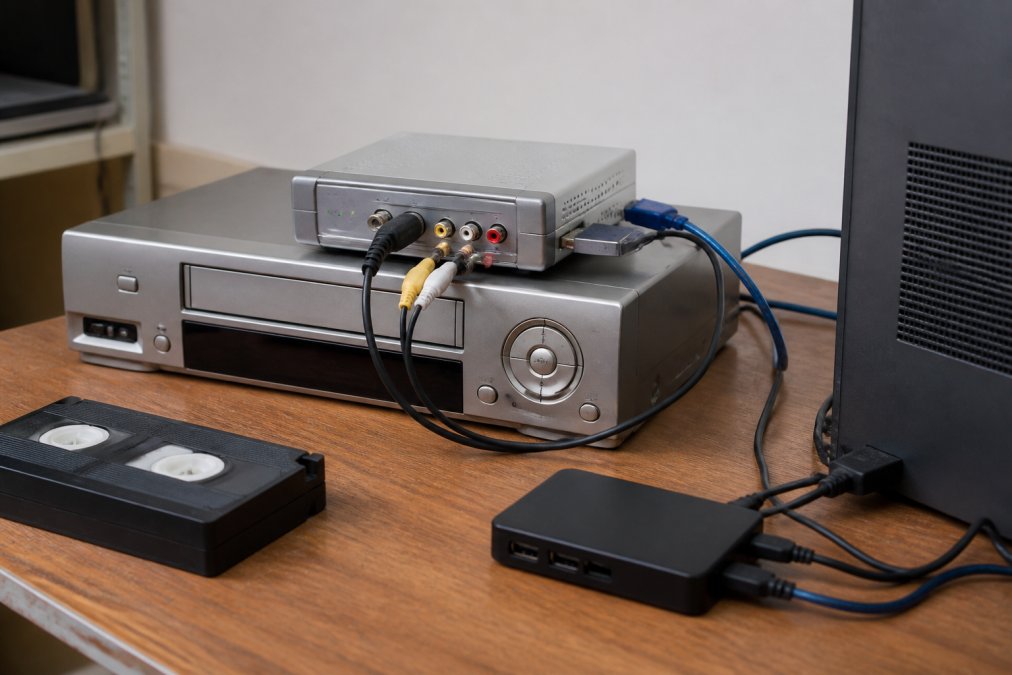
A video capture card converts the analogue video signal into digital data. Consumer-grade USB devices compress heavily, losing detail; professional-grade cards maintain higher bitrate and better codecs. Higher bitrate preserves more visual information, especially in areas with fine detail or rapid motion.
Playback equipment matters equally. Worn VCR heads don’t read tape consistently. A time base corrector stabilises the video signal from aging equipment, removing jitter and timing errors. Without one, you’ll see visible artifacting in your converted video.
For film reels, a film scanner reads each frame optically. The scanner’s optics and sensor determine how much detail you recover. Budget scanners produce soft, washed-out results; professional equipment with colour calibration captures original saturation and contrast.
A tape that hasn’t played in 30 years may have oxide shedding or warping, but modern equipment can often read enough signal to produce a usable transfer. What matters is equipment designed to handle degraded media.
Best File Format for Digitising VHS
The right file format affects file size, device compatibility, and editability. Choose based on your intended use.
Most professionals recommend lossless or visually lossless compression. Lossless discards no information; visually lossless removes imperceptible data, resulting in smaller files.
H.264 is widely compatible and maintains good quality at higher bitrates, but uses lossy compression. For long-term archival, this isn’t ideal.
ProRes or DNxHD use visually lossless compression with superior quality preservation. If you plan to edit, colour-correct, or restore footage, these formats offer more flexibility. You can create smaller H.264 copies for sharing later.
The file container also matters. MP4 is universal but limited for professional work. MOV suits editing workflows. MKV is open-source and supports extensive metadata for archival.
Ask your digitisation service what format they deliver and their archival recommendation based on your priorities: compatibility, editability, or long-term preservation.
VHS to Digital Resolution Guide
Resolution describes how many pixels your digital video contains. Higher resolution captures more detail, but the relationship between tape quality and achievable resolution isn’t linear.
A standard VHS tape has a theoretical maximum resolution around 240-250 lines, translating to roughly 720×480 pixels (NTSC) or 720×576 pixels (PAL). You cannot create resolution that wasn’t on the original tape; upscaling to 1080p just enlarges pixels without recovering missing detail.
Practical resolution depends on tape condition and capture equipment. Well-maintained tape yields clean 720×480 output; degraded tape produces noisier video with visible artifacting.
Frame rate is equally important. NTSC video runs at 29.97 frames per second (fps). PAL runs at 25 fps. Digital formats must match these rates or perform de-interlacing, a process that converts the interlaced video signal (where odd and even lines are recorded separately) into progressive frames. Poor de-interlacing creates visible combing effects on moving objects.
The resolution question families ask most often is whether they should upscale to HD. The honest answer: upscaling doesn’t recover detail you don’t have. It can make the video look sharper through interpolation, but you’re not gaining information. For viewing on modern screens, 720×480 scaled up to fill a 1080p display looks acceptable. For archival, keeping the native resolution of the source tape is more honest and preserves the original fidelity.
Is Digitising Family Film Reels Worth It
Film reels, 8mm, Super 8, or 16mm, represent a different preservation challenge than VHS. Film doesn’t degrade the same way tape does, but it does deteriorate, and playback equipment has become scarce.
The worthiness calculation depends on several factors. First, film is more stable than magnetic tape if stored properly in cool, dry conditions. A well-stored 8mm reel from the 1970s can still be played today. However, most home film collections aren’t stored optimally. Basements and attics experience temperature and humidity fluctuations that cause film emulsion to become brittle and colours to fade.
Second, consider availability of playback equipment. Film projectors are becoming harder to find and maintain. If your projector breaks, finding repair services or replacement equipment becomes difficult. Digitising removes this dependency, you can play the files on any modern device indefinitely.
Third, digitised film opens possibilities you can’t achieve with physical media. You can share files with distant relatives instantly. You can edit clips together. You can colour-correct faded footage. Physical film can only be projected or copied to other film stock.
The cost-benefit analysis: digitising family film typically costs more per reel than VHS conversion because the equipment is more specialised. Whether it’s worth it depends on the sentimental and historical value of the footage. Home movies from the 1960s capturing your parents’ wedding or your childhood are irreplaceable. Footage that’s already been transferred to VHS or digital might be lower priority.
Many families find the answer becomes clear once they see the results. Watching digitised 8mm film on a modern screen with restored colours often triggers memories and emotions that justify the investment.
How to Improve Old Video Quality During Conversion
Video restoration during digitisation is where professional services genuinely add value beyond what consumer-grade equipment can achieve. Several techniques can recover detail and reduce visible degradation without fabricating information that wasn’t there.
De-interlacing is the first step. VHS and broadcast video use interlaced recording, odd lines and even lines are recorded separately. When you capture this as progressive video (which modern devices expect), poor de-interlacing creates visible combing on moving objects. Advanced de-interlacing algorithms analyse motion and blend frames intelligently, producing smooth results.
Noise reduction removes the grain and speckles that accumulate on aging tape. The challenge is reducing noise without softening detail. Aggressive noise reduction makes video look plastic and unnatural. Careful noise reduction preserves edges and texture while cleaning up the signal. This is where experience matters, knowing how much reduction is appropriate for different types of footage.
Colour correction addresses fading and colour shifts. Old VHS tapes often have a blue or yellow cast from tape degradation.
Long-Term Digital Preservation and Storage
Creating digital files is only half the job. Keeping them accessible and uncorrupted for decades requires intentional strategy.
Common Video Transfer Problems and Solutions
Digitisation often surfaces problems that weren’t obvious when the media was simply sitting unwatched. Understanding what’s normal and what’s fixable helps manage expectations.
Frequently Asked Questions
What resolution should I digitise VHS tapes to maintain quality?
VHS content typically contains approximately 240-250 lines of vertical resolution. Digitising at 720×480 (NTSC) or 720×576 (PAL) captures the full quality of the original tape without wasting storage on unnecessary pixels. Higher resolutions like 1080p won’t improve quality because the source material simply doesn’t contain that detail. Use these standard resolutions to preserve exactly what’s on the tape.
What is the best file format for digitising VHS to ensure compatibility and longevity?
MP4 with H.264 codec offers the best balance of file size, compatibility and quality for home video conversion. For archival purposes where storage isn’t a concern, consider lossless formats like ProRes or DNxHD, which preserve every detail of the digitised content. MP4 plays on virtually all modern devices, televisions, computers, tablets and smartphones, making it ideal for sharing family memories across generations.
Does the age of a VHS tape affect the final digital quality?
Yes, significantly. Older tapes suffer from magnetic tape degradation, colour shift, tracking errors and signal noise that accumulate over decades. Tapes stored in poor conditions, high heat, humidity or sunlight, degrade faster. Professional digitisation equipment can partially correct some issues through de-interlacing and signal stabilisation, but severely degraded tapes will show artifacting and frame drops. The sooner you digitise aging media, the better the result.
Can professional equipment really improve the quality of old, damaged home videos?
Professional-grade video capture cards and time base correctors can stabilise the analog signal, reduce noise and correct minor playback speed variations that consumer equipment misses. Post-processing software can further reduce artifacting, improve colour balance and enhance sharpness. However, no equipment can recover detail that was never recorded. Professional digitisation minimises quality loss and restores what the original tape contained, but cannot create detail that doesn’t exist in the source material.
What’s the difference between lossy and lossless video formats for archiving family memories?
Lossless formats preserve every pixel of the digitised video, making them ideal for permanent archival where you want to retain maximum quality for future restoration or sharing. Lossy formats like H.264 compress video by discarding some data, reducing file size significantly while maintaining visual quality acceptable for most viewing. For family archival, lossless is safer for long-term preservation, but lossy formats like MP4 are practical for everyday playback and sharing.
How do I know if my old VHS tapes are too degraded to digitise successfully?
Signs of severe degradation include visible mould, sticky residue, flaking oxide coating or a vinegar smell indicating tape vinegar syndrome. Playback issues like severe tracking errors, colour dropout or complete signal loss suggest the tape may be unreadable. Professional digitisation services can assess tapes before conversion. Many tapes that appear damaged can still be partially recovered with specialised equipment, but severely degraded tapes may yield only fragments of usable video.
What equipment is essential for high-quality home video conversion?
A quality video capture card with composite or S-video input, a time base corrector to stabilise the analog signal, and a reliable VCR or film projector in good working condition are essential. Software for video encoding and post-processing restoration is equally important. Professional digitisation services use industrial-grade equipment specifically designed to handle legacy formats and extract maximum quality from aging media, which typically outperforms consumer-level equipment.